On this page
Bill of materials software helps a manufacturing team manage the parts, quantities, and assemblies needed to build a product. Before moving from Excel, check whether the new system can import one trusted assembly, calculate its material cost, and reproduce the version your team approved. Use those results to choose a tool and decide how much of your workflow to migrate.
For a small hardware team, engineering needs an inspectable product structure and purchasing needs usable quantities. Bring your own parts list and a checked total to the vendor demo so both teams can judge the output.
You can also use Atoms to build a BOM review app around your team's workflow: inspect an imported parts list, expand an assembly tree, compare supplier quotes, and keep working changes separate from released records. This guide gives you a $56-to-$60 cost example and a complete build prompt to turn those requirements into app pages and checks.
Turn your parts list into a BOM review app with cost and revision views.
What bill of materials software should manage
A manufacturing bill of materials, or BOM, describes what goes into a physical product. It can include individual parts, materials, and subassemblies, together with the quantities needed to produce the parent assembly.
The essential relationship is between an item and its usage. The item identifies a part; the usage says how much of that part a particular assembly needs. One screw can appear in several products, with a different quantity in each. Keeping the screw's identity separate from those quantities makes the part reusable.
| Data object | Information it holds | Question it answers |
|---|---|---|
| Item record | Part number, description, unit, relevant specification | Which part is this? |
| BOM usage | Parent assembly, child item, quantity per parent | Where and how much is it used? |
| Supplier quote | Supplier, currency, price basis, quantity break, date | Which commercial assumption produced this estimate? |
| Released BOM | Approved structure and revisions, release reference | What did the team authorize for this build? |
You also need views for different jobs. A single-level BOM shows an assembly's immediate children. A multi-level BOM keeps the hierarchy of subassemblies. A flattened view totals component quantities across levels, which helps purchasing when the team makes the subassemblies and buys their constituent parts.
The similar term software bill of materials, or SBOM, belongs to software supply-chain work. CISA's SBOM resources describe records of software components and their relationships. This guide concerns manufacturing parts and assemblies.
Choose the workflow before choosing the vendor
Choose your system's scope around the task that is failing today. If engineers lose track of part changes and suppliers receive conflicting files, product structure and release control deserve priority. If production needs stock allocation, shortages, purchase orders, and scheduling, assess those connected operations as part of the trial.
The official pages of established tools illustrate these different emphases:
| Tool to investigate | Vendor-documented emphasis | What to ask it to demonstrate |
|---|---|---|
| OpenBOM | Multiple BOM views, collaborative product data, revisions and change workflows | Reuse a part in two assemblies, inspect its usages, and export a released structure |
| MRPeasy | CSV imports, multi-level BOMs, revisions, costing and material planning | Import your assembly, compare costs, then show how an order creates material requirements |
| Katana | Subassemblies, manufacturing costing, inventory and production connections | Show how a product recipe connects to materials, operations and inventory |
These are starting points from vendor documentation. Test the workflow in the plan you would actually purchase. Ask which roles need paid access, which integrations are included, how onboarding works, and what data you can export if you leave. Record subscription, implementation, data cleanup, and integration work separately when comparing costs.
Bill of materials management software may be part of a broader manufacturing system. MRPeasy, for example, explains that MRP uses BOM data with order quantities and inventory availability to plan materials. Decide whether that broader scope solves an immediate operational problem before migrating every business process.
Prepare a portable bill of materials template
Create a small, clean import fixture before moving the full workbook. Choose an assembly that someone on the team can independently check, including a subassembly and a part used more than once.
Use separate item records and parent-child usage records in your preparation files. A simple bill of materials template for the usage relationships might look like this:
This is a portable data model for preparing your information. Map it to the chosen system's documented importer; column names, assembly creation order, and revision handling vary by tool.
Preserve part numbers as text so leading zeros survive. Give units explicit meanings, and resolve inconsistent names before import. Separate a supplier's part number from your internal identifier. If a component can be bought complete or made from smaller parts, record that decision because it changes what purchasing needs.
Keep commercial information in its own records. A price should retain the supplier, currency, applicable order quantity, unit basis, and quote date. A price for a pack of screws must be converted consistently before it enters an estimate expressed per screw. An expired quote should remain identifiable as expired.
Back up the source workbook and import into a trial or sandbox. Inspect rejected rows and changed mappings. Then repeat the same import to check whether it updates the intended records or creates duplicates. A useful import result includes an explanation of what was accepted, rejected, and changed.
Check the cost rollup with one small assembly
Check nested costs from the bottom up. In this fictional USD example, one kit contains an enclosure, a control board, and two drive modules. Each module contains one motor, two brackets, and four screws. Assume the team makes the modules and buys their leaf components.
| Purchased component | Quantity per immediate parent | Unit quote | Extended cost at that level |
|---|---|---|---|
| Enclosure, in kit | 1 | $12.00 | $12.00 |
| Control board, in kit | 1 | $18.00 | $18.00 |
| Motor, in drive module | 1 | $9.00 | $9.00 |
| Bracket, in drive module | 2 | $1.50 | $3.00 |
| Screw, in drive module | 4 | $0.25 | $1.00 |
The material estimate for one drive module is $13: $9 + $3 + $1. The kit needs two modules, so its material estimate is $56: $12 + $18 + (2 × $13).
Now change only the motor quote from $9 to $11. Each module becomes $15, and the kit becomes $60. The difference is $4 per kit, or $400 for 100 kits. The two affected levels should be visible: motor price changes the module total, and module quantity changes the kit total.
Use the same example to check flattened quantities. One kit needs two motors, four brackets, and eight screws. For 100 kits, the corresponding requirements are 200 motors, 400 brackets, and 800 screws, alongside 100 enclosures and 100 control boards. Counting both the made module and its purchased contents as purchases would double count this structure.
These figures are a quote-based material estimate. Labor, overhead, freight, tax, scrap, and currency conversion need their own stated assumptions when relevant. Actual inventory or production costs can differ from the supplier quote you used for comparison. Require the software to show which cost basis produced each total.
Separate supplier quotes from released revisions
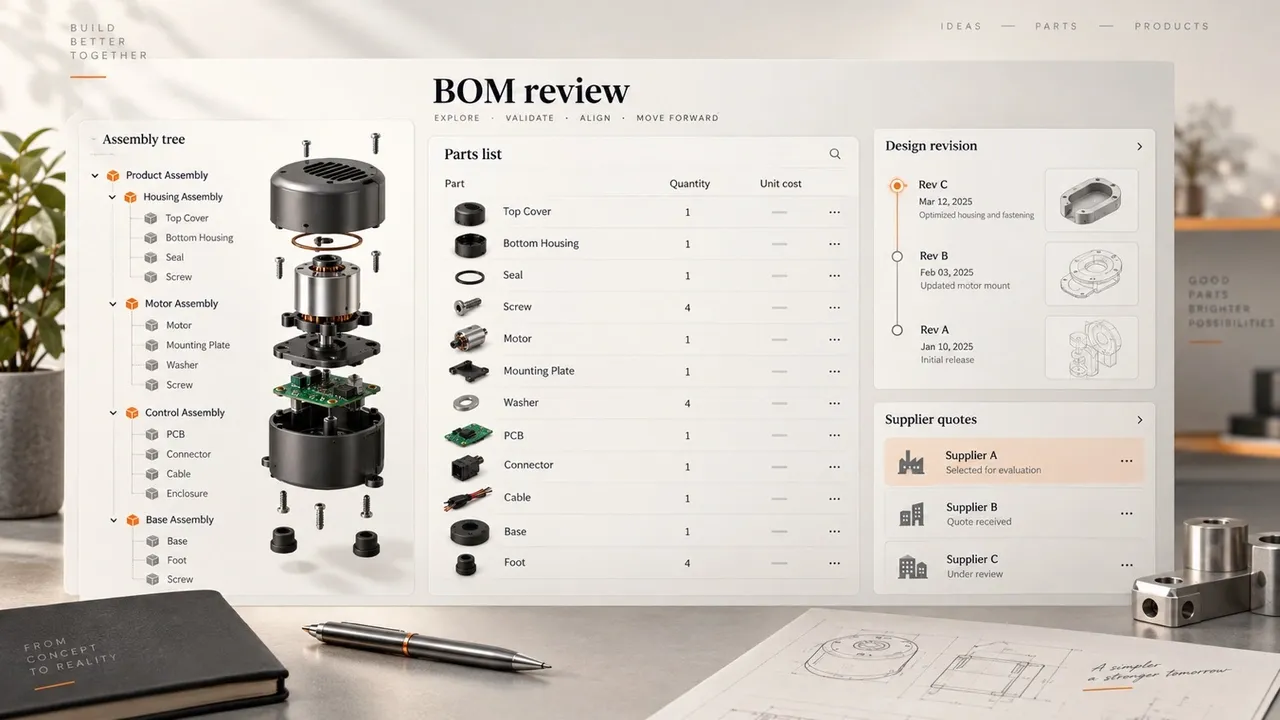
AI-generated editorial concept; not a screenshot of a deployed app.
A supplier price change and a design change need separate records. In the example, the motor's higher quote changes the estimated cost while the required part and quantity stay the same. Replacing it with another motor is a structural change that requires an engineering decision about compatibility.
Keep the BOM revision, quote set, and release record connected, with their own identities. Save the approved structure and the cost assumptions used at that point. A buyer should be able to open today's estimate while an engineer can still reproduce the assembly released earlier.
Run three acceptance tests during the trial:
- Import and structure. Reconstruct the kit and its drive modules. Check part identities, parent-child relationships, quantities, units, and the flattened requirements against the source files.
- Quote change. Change the motor quote to $11 without editing quantities. Check the $60 kit estimate, the $4 difference, and the ability to reopen the original $56 quote-based estimate.
- Release and export. Save an approved revision, create a later working change, then export the approved version again. Compare its identifiers, quantities, and revision labels with the original release. Check that a purchasing user sees the version intended for that order.
Also give the system bad input. An unknown child part, a missing price, inconsistent units, or an assembly that contains itself should produce a visible problem. Treat an incomplete cost as incomplete: a blank motor price presented as a zero-cost motor would make the headline total misleading.
Agree on who can edit, approve, and export. Record the revision used for each purchasing or manufacturing handoff. Shared access is useful when the release decision and the data behind it are clear to the people doing the work.
Build a BOM review app in Atoms
Atoms builds web apps from natural-language requirements, including the interface, backend logic, database and user login. Its AI App Builder lets you describe the workflow, review the generated app, refine the preview and deploy through Atoms Cloud. For this guide, give it a specific internal tool to build: a shared workspace where engineering inspects assembly relationships and purchasing compares quote-based costs.
Turn the requirements above into four useful app screens:
- Import review: preview CSV column mappings and inspect rejected rows before saving.
- Assembly view: expand subassemblies and switch to the purchased-parts quantities your buyer needs.
- Quote comparison: select a quote set, inspect the cost inputs, and compare the $56 and $60 kit estimates.
- Revision history: review working edits alongside saved release snapshots and export the chosen version.
These are the app requirements you will give Atoms. Use the AI Coding Assistant to refine the generated pages and backend behavior together—for example, ask it to show the missing motor quote beside an incomplete total, then check that result in the preview.
Copy the complete prompt below. Open Atoms with the button after it, sign in if needed, and paste the prompt to begin building.
Copy this brief into Atoms to build your assembly tree, quote comparison, and revision views.
Check the generated calculations against the fixture before using the app for a real build. The BOM rules, released snapshots and role permissions are requirements for your app; the prompt supplies expected results for checking their implementation. Review each with the responsible person:
| Checkpoint | Human owner | Evidence to inspect |
|---|---|---|
| Part substitution | Engineering | Specifications and compatibility decision |
| Supplier quote selection | Purchasing | Supplier, currency, quantity break and validity |
| Calculation behavior | Technical reviewer | Fixture totals and invalid-input results |
| Approval and access | Product owner | Separate-user checks and preserved release export |
Once the checks pass, deploy the review app for your team. If you also need purchasing execution, shop-floor planning, or inventory accounting, include those requirements in the system decision and assess the relevant manufacturing tools directly.
Conclusion
Take one approved assembly into your next BOM software trial. Require a correct import, an explainable cost change, and a reproducible released export before expanding the migration. That gives engineering and purchasing a shared way to judge the result.
Build your team's review workflow in Atoms using the prompt above. Start with one assembly, compare the two quote sets, and check the saved release export with engineering and purchasing. Then adapt the screens and fields to the way your team works.
Build a BOM review app for your team, starting with one assembly and its checked costs.
Frequently asked questions
01Q1: What is the difference between a part revision and a BOM revision?
A part revision identifies a particular definition of a component. A BOM revision identifies a particular assembly structure, including the chosen children and quantities. Preserve both when your release process depends on which component definition was approved for an assembly.
02Q2: Can I buy a complete subassembly instead of its individual parts?
Yes, your purchasing view should reflect the make-or-buy decision. If you buy the complete drive module, purchasing needs that module and its supplier terms. If you make it, purchasing needs its components. Check the system's treatment of each branch so the export follows your actual sourcing plan.
03Q3: How should I handle a missing component price?
Mark the estimate incomplete and identify the component requiring a quote. You can show a partial total, clearly labeled with its missing inputs. Confirm how the tool handles blank prices before anyone uses the total for a customer quotation.
04Q4: Does importing a BOM tell me what I need to buy?
It establishes the components required by the product structure. Calculating shortages also needs the build quantity, usable inventory, existing commitments, incoming supply, and timing assumptions. Test those inputs in the manufacturing or planning workflow you intend to use.
